

Reading data from files is super common in C programs. So, let’s say you’ve got a file with multiple lines and only wanna grab the first line. How do you do that? We’re gonna tackle just that using C's file handling features. We’ll walk you through opening a file, reading its first line, and then closing the file the right way.
Prerequisites for the C Program to Read First Line From a File
Make sure you've covered the following before diving in:
- Understanding of
FILEpointer andfopen()function. - Familiarity with reading strings using
fgets(). - Basic knowledge of file paths and text files.
- Any C compiler such as GCC 9 or newer — or just run it in the EduSeekho online compiler.
Source Code of C Program to Read the First Line From a File
Below is the complete source code for reading the first line from a file in C.
#include <stdio.h>

int main() {
    FILE *file;
    char buffer[256];
    char filename[100];

    // Ask user for the filename
    printf("Enter the name of the file: ");
    scanf("%s", filename);

    // Open the file for reading
    file = fopen(filename, "r");
    if (file == NULL) {
        printf("Could not open file %s\n", filename);
        return 1;
    }

    // Read the first line from the file
    if (fgets(buffer, 256, file) != NULL) {
        printf("First line: %s", buffer);
    }

    // Close the file
    fclose(file);

    return 0;
}
Try this code yourself — free
Run it in the EduSeekho online compiler. No setup needed.
Output of the Read First Line from File Program
Here's what you'll see when you run the program:
Enter the name of the file: testfile.txt
First line: This is the first line of the file.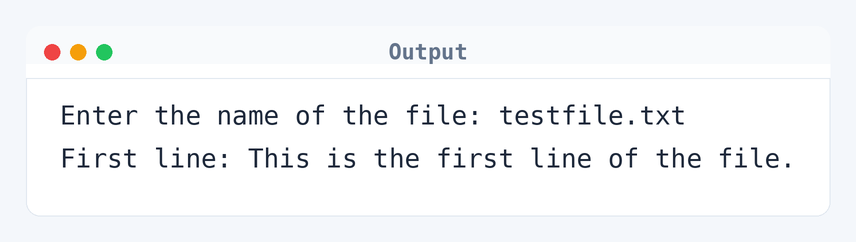
Algorithm to Read the First Line From a File in C
To read the first line from a file, we need to execute several steps. This involves opening the file, reading the line, and then closing the file. Here's a step-by-step breakdown.
- Prompt the user to enter the filename.
- Open the file using
fopen()in read mode. - If the file cannot be opened, print an error message and exit.
- Use
fgets()to read the first line from the file into a buffer. - Print the buffer containing the first line.
- Close the file using
fclose().
flowchart TD
  A([Start]) --> B[Open the file with fopen]
  B --> C{File exists?}
  C -->|No| D[Print error]
  D --> E([End])
  C -->|Yes| F[Use fgets to read the first line]
  F --> G[Print the first line]
  G --> H[Close the file]
H --> EHow the C Program to Read the First Line Works
Let's walk through each part of the code to understand how it works.
#include <stdio.h>includes the standard I/O library, which is necessary for file handling functions likefopen()andfgets().- The main function begins with the declaration of the
FILEpointerfileand character arraysbufferandfilenameto store the first line and filename respectively. - The user is prompted to enter the filename, which is read into the
filenamearray usingscanf(). - The file is opened in read mode using
fopen(). If the file doesn't exist, a message is printed and the program exits. fgets()is used to read the first line from the file, storing it in thebuffer. This function reads up to 255 characters or until a newline is encountered.- If the
bufferis filled successfully, the program prints the first line. - The file is then closed using
fclose()to free up resources.
Quick Quiz — test your understanding
Tap an option to check your answerWhat function is used to read a line from a file in C?
Time and Space Complexity of the C Program
Analyzing the time and space complexity gives insight into the performance of the program.
Time Complexity: O(n), where n is the number of characters in the first line of the file. This is because fgets() reads characters one by one until a newline is encountered or the buffer limit is reached. For instance, a line with 100 characters results in 100 read operations.
Space Complexity: O(1). The program uses a fixed amount of space, specifically for the buffer and filename arrays, irrespective of the input file size.
Common mistake: Forgetting to close the file with fclose() can lead to memory leaks and resource exhaustion.
Key takeaway: Efficient file handling in C means you gotta open, read, and close files correctly to keep everything running smoothly.
FAQs About C Program to Read the First Line From a File
Here are some common questions regarding this program.
fopen() returns NULL and it prints an error message.fgets() reads up to n-1 characters, where n is the size of the buffer. It stops at a newline or when the buffer fills up.fgets() in a loop.fclose() releases resources for the file and helps maintain data integrity.<stdio.h> library for file handling functions like fopen(), fgets(), and fclose().Related Programs
If you found this program helpful, check out these related programs:
- C Program to Write a Sentence to a File
- C Program to Find the Size of int, float, double and char
- C Program to Display its own Source Code as Output
- C Program to Write Hello World - Full Code and Output
- C Program to Print an Integer Entered by the User
Conclusion
Opening, reading, and closing files is key for any C programmer. This program helps you get started with reading specific lines. Next, try tweaking it to read a certain line number. Notice how the logic shifts. Small changes often lead to big impacts.
Test this code more in the EduSeekho C compiler, and push yourself with more programs using the C language quiz.