

Converting numbers from one base to another is pretty handy in programming. Got a hexadecimal number '1A3'? You’ll need its decimal equivalent. In C, it's easy to whip up a program for this conversion. You'll break each character of the hexadecimal number down into its decimal equivalent, then sum 'em up. Let’s see how you can do it.
Prerequisites for the Hexadecimal to Decimal Program in C
Before you start coding, ensure you have these concepts clear:
- Understanding of
strlen()for string length - Usage of loops like
whileorfor - Basic knowledge of character operations and ASCII values
- Any C compiler such as GCC 9 or newer — or just run it in the EduSeekho online compiler
Source Code of C Program to Convert Hexadecimal to Decimal
Here's the complete C code that converts a hexadecimal number to its decimal equivalent:
#include <stdio.h>
#include <string.h>

int main() {
    char hexInput[20];
    long decValue = 0;
    int length, base = 1, index, decDigit;

    printf("Enter a hexadecimal number: ");
    scanf("%s", hexInput);

    length = strlen(hexInput);

    for (index = length - 1; index >= 0; index--) {
        if (hexInput[index] >= '0' && hexInput[index] <= '9') {
            decDigit = hexInput[index] - '0';
        } else if (hexInput[index] >= 'A' && hexInput[index] <= 'F') {
            decDigit = hexInput[index] - 'A' + 10;
        } else if (hexInput[index] >= 'a' && hexInput[index] <= 'f') {
            decDigit = hexInput[index] - 'a' + 10;
        }
        decValue += decDigit * base;
        base *= 16;
    }
    printf("Decimal value: %ld\n", decValue);

    return 0;
}
Try this code yourself — free
Run it in the EduSeekho online compiler. No setup needed.
Output of the Hexadecimal to Decimal Program
When you run the program and input a hexadecimal number, it will display the decimal conversion:
Enter a hexadecimal number: 1A3
Decimal value: 419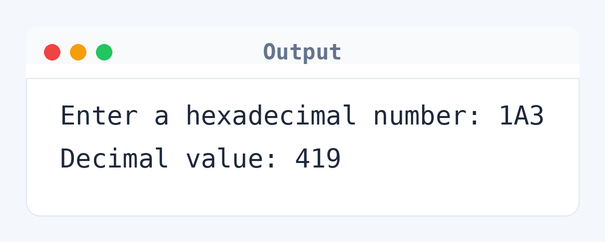
Algorithm to Convert Hexadecimal to Decimal in C
Converting a hexadecimal number to a decimal involves understanding and processing each character of the string from right to left. Here is the step-by-step algorithm the program uses:
- Read the hexadecimal string from the user.
- Initialize
decValueto zero. - Find the length of the string.
- Loop through each character of the string from end to start.
- Convert each character to its decimal equivalent.
- Multiply the converted value with the power of 16 based on its position.
- Add the result to
decValue. - Continue until all characters are processed.
- Print the
decValueas the decimal equivalent.
flowchart TD
  A([Start]) --> B[/Read hexInput/]
  B --> C[decValue = 0]
  C --> D[length = strlen(hexInput)]
  D --> E[index = 0]
  E --> F{index < length?}
  F -->|Yes| G[character = hexInput[index]]
  G --> H{"character >= '0' && character <= '9'?"}
  H -->|Yes| I[decDigit = character - '0']
  H -->|No| J{"character >= 'A' && character <= 'F'?"}
  J -->|Yes| K[decDigit = character - 'A' + 10]
  J -->|No| L{"character >= 'a' && character <= 'f'?"}
  L -->|Yes| M[decDigit = character - 'a' + 10]
  M --> O
  K --> O
  I --> O
  O[decValue = decValue * 16 + decDigit] --> P[index = index + 1]
  P --> F
  F -->|No| Q[/Print decValue/]
Q --> R([End])How the C Program to Convert Hexadecimal to Decimal Works
Let's break down how each part of the program functions.
#include <stdio.h>and#include <string.h>: These headers include the standard input-output library and string handling functions.char hexInput[20]: This array stores the hexadecimal string input by the user. The size can be adjusted based on expected input length.long decValue = 0: Initializes the variable that will hold the decimal equivalent of the input string.int length, base = 1, index, decDigit: Declare variables to handle the string length, the base for multiplication (initially 1, representing 16^0), the loop index, and the decimal digit equivalent for each character.scanf("%s", hexInput): Reads the hexadecimal string from the user.length = strlen(hexInput): Calculates the length of the string using thestrlen()function.forloop: Iterates over each character from the end of the string to the beginning.ifcondition: This checks if the current character is between '0' and '9', 'A' and 'F', or 'a' and 'f', and then converts it into a decimal digit.decValue += decDigit * base: Adds the calculated decimal digit value to the total based on the current power of 16.base *= 16: Multiplies the base by 16 as the loop progresses, adjusting the weight for the next digit to the left.printf("Decimal value: %ld\n", decValue): Outputs the final decimal value of the input hexadecimal string.
Quick Quiz — test your understanding
Tap an option to check your answerWhat does the C program convert?
Time and Space Complexity of the Hexadecimal to Decimal Conversion
Understanding the efficiency of this program helps when dealing with large inputs.
Time Complexity: O(n). The time grows linearly with the number of characters in the hexadecimal string. Here, n is the number of digits in the hexadecimal number — for example, it is 3 if the input is '1A3'. The for loop processes each character once, so 4 characters mean 4 iterations.
Space Complexity: O(1). The program utilizes a fixed amount of space regardless of the input size, using only the variables hexInput, decValue, length, base, index, and decDigit — making a total of six.
Common mistake:Don't forget to think about both uppercase ('A'-'F') and lowercase ('a'-'f') characters when converting hexadecimal digits to decimal.
Key takeaway:Hexadecimal conversion needs careful handling of character values and powers of 16.
FAQs About C Program to Convert Hexadecimal to Decimal
Here are common questions students ask when learning about converting hexadecimal numbers to decimal in C.
long type in C. For even larger numbers, you might need fancy libraries or data types.base starts at 1, which is 16^0. It gets multiplied by 16 in each loop to match the positional value of the digit you're working on.strtol() function can convert a string in any base to a long integer. But doing it manually is great for understanding the conversion.Related Programs
If you found this program helpful, check out these related programs:
- C Program to Convert Binary to Decimal with Code and Output
- C Program to Convert Binary to Octal with Sample Output
- C Program to Convert Binary to Decimal and Vice-Versa
- C Program to Convert Decimal to Octal
- C Program to Convert Octal to Binary with Example
Conclusion
Converting from hexadecimal to decimal is a cool way to grasp different number bases in programming. Once you're comfy with it, try writing a C program to convert decimal numbers back to hexadecimal. It's a fun way to deepen your understanding of these ideas. Keep at it, and you’ll see how this logic applies in real-world situations.
Challenge yourself to tackle more C programs. Check out our C language quiz and give coding a shot with the EduSeekho online compiler.