

Converting a binary number to an octal number can be step-by-step. For example, the binary number 110101 turns into octal as 65. This switch between base 2 and base 8's important in computing when you need compact number representation.
Let’s see what you’ll need to convert binary to octal using a C program.
What You Need Before Writing the C Program to Convert Binary to Octal
Get ready with the following:
- Knowledge of the
%and/operators for remainder and division. - Understanding of loops in C, particularly the while loop.
- Basic input/output using
<stdio.h>. - Any C compiler such as GCC 9 or newer — or just run it in the EduSeekho online compiler
Source Code of C Program to Convert Binary to Octal
Here's the source code for converting binary to octal in C. The program reads a binary number, processes groups of three bits, and outputs the corresponding octal number.
#include <stdio.h>

int main() {
    long binary, octal = 0, power = 1;
    int rem;

    // Read binary number
    printf("Enter a binary number: ");
    scanf("%ld", &binary);

    // Convert binary to octal
    while (binary != 0) {
        rem = binary % 1000;
        octal += binaryToDecimal(rem) * power;
        binary /= 1000;
        power *= 10;
    }

    printf("The octal equivalent is: %ld\n", octal);
    return 0;
}

int binaryToDecimal(int binary) {
    int decimal = 0, base = 1, lastDigit;
    while (binary) {
        lastDigit = binary % 10;
        binary /= 10;
        decimal += lastDigit * base;
        base *= 2;
    }
    return decimal;
}
Try this code yourself — free
Run it in the EduSeekho online compiler. No setup needed.
Output of the Convert Binary to Octal Program
When you provide the binary number 110101, the program outputs the octal number 65. See it in action below.
Enter a binary number: 110101
The octal equivalent is: 65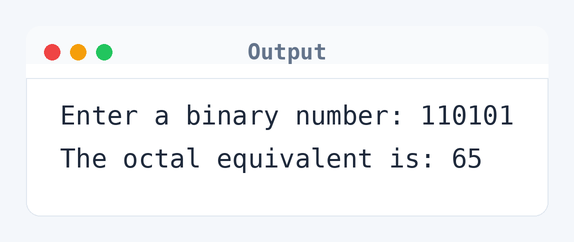
Algorithm to Convert Binary to Octal in C
To convert binary to octal, the program processes the binary number in chunks of three bits and calculates their octal equivalent. Here is the step-by-step logic:
- Initialize
octalto0andpowerto1. - Read the binary number from user input.
- While the binary number isn't zero, repeat steps 4-6.
- Extract the last three digits of the binary number.
- Convert these three digits to their decimal equivalent.
- Multiply this decimal by the current power of
10and add tooctal. - Divide the binary number by
1000. - Increase the power of
10.
flowchart TD
  A([Start]) --> B[/Read binary number/]
  B --> C[Initialize octal to 0]
  C --> D[Initialize power to 1]
  D --> E{"binary != 0?"}
  E -->|Yes| F["rem = binary %% 1000"]
  F --> G["decimal = rem to decimal"]
  G --> H["octal += decimal * power"]
  H --> I["binary /= 1000"]
  I --> J["power *= 10"]
  J --> E
  E -->|No| K[/Print octal/]
K --> L([End])How the C Program to Convert Binary to Octal Works
Let's go through how each part of the program works to convert from binary to octal.
- The program starts by including the standard I/O library with
#include <stdio.h>. - Within
main(), we declare variablesbinary,octal, andpower, initializingoctalandpowerto0and1respectively. - The program prompts the user to enter a binary number, reading input with
scanf()into thebinaryvariable. - It employs a
whileloop to process each group of three binary digits. rem = binary % 1000extracts the last three digits of the binary number.- These three digits are then converted to decimal using the helper function
binaryToDecimal(). - The octal number is updated with
octal += decimal * power. - After processing, the binary number is reduced using
binary /= 1000. - The power of
10is increased by multiplying with10. - Finally, the program prints the octal equivalent using
printf().
Quick Quiz — test your understanding
Tap an option to check your answerWhat is the main purpose of dividing the binary number by 1000 in the conversion process?
How Fast Is the C Program to Convert Binary to Octal?
Understanding how efficient the program is can help in optimizing it if needed.
Time Complexity: O(n), where n is the number of binary digits. The loop processes each group of three digits using binary /= 1000, so 9 digits need about 3 iterations.
Space Complexity: O(1) as it uses a fixed set of variables: binary, octal, power, rem, and temporary variables in the binaryToDecimal function.
Common mistake:Not handling binary numbers that aren't divisible by 3 can lead to wrong conversions.
Key takeaway:Chunking binary numbers in threes gets you their correct octal representation.
FAQs About C Program to Convert Binary to Octal
Here are some frequently asked questions about this program:
Related Programs
If you found this program helpful, check out these related programs:
- C Program to Convert Octal to Decimal: Full Code & Output
- C Program to Convert Decimal to Octal
- C Program to Convert Octal to Binary with Example
- C Program to Convert Binary to Decimal with Code and Output
- C Program to Convert Binary to Decimal and Vice-Versa
Conclusion
Remember to carefully process each chunk of binary digits to get the right octal number. If you’re interested in related operations, try converting binary to hexadecimal next — it’s similar. Smaller base representations make complex data easier to handle.
Test your skills further with more C programming challenges. Check out our C quiz and try this code in the C online compiler!