

Converting numbers between binary and decimal systems is a common task in computer science. Check out this C program that takes care of both conversions. You can use it to flip binary numbers like 1010 into decimal and back again.
This task comes in handy in systems working with machine-level operations or memory addresses. Let's dive into how you can pull this off with some straightforward logic.
Prerequisites for the C Program to Convert Binary to Decimal
Before diving into the code, ensure you're familiar with these concepts:
- The modulus operator
%to extract digits - Looping constructs like
whileloops - Basic understanding of binary and decimal systems
- Any C compiler such as GCC 9 or newer — or just run it in the EduSeekho online compiler
Source Code of C Program to Convert Binary Number to Decimal and vice-versa
Here's the complete code for converting binary numbers to decimal and vice-versa.
#include <stdio.h>

void convertBinaryToDecimal() {
    int binary, decimal = 0, base = 1, rem;
    // Input binary number
    printf("Enter a binary number: ");
    scanf("%d", &binary);
    // Loop to convert to decimal
    while (binary != 0) {
        rem = binary % 10;
        decimal += rem * base;
        base *= 2;
        binary /= 10;
    }
    printf("Decimal equivalent: %d\n", decimal);
}

void convertDecimalToBinary() {
    int decimal, binary = 0, base = 1, rem;
    // Input decimal number
    printf("Enter a decimal number: ");
    scanf("%d", &decimal);
    // Loop to convert to binary
    while (decimal != 0) {
        rem = decimal % 2;
        binary += rem * base;
        base *= 10;
        decimal /= 2;
    }
    printf("Binary equivalent: %d\n", binary);
}

int main() {
    int choice;
    printf("Choose conversion type: \n1. Binary to Decimal\n2. Decimal to Binary\n");
    printf("Enter your choice (1 or 2): ");
    scanf("%d", &choice);

    if (choice == 1) {
        convertBinaryToDecimal();
    } else if (choice == 2) {
        convertDecimalToBinary();
    } else {
        printf("Invalid choice\n");
    }
    return 0;
}
Try this code yourself — free
Run it in the EduSeekho online compiler. No setup needed.
Output of the Convert Binary to Decimal Program
Here is what the program outputs when you run it with the input binary number 1010:
Choose conversion type:
1. Binary to Decimal
2. Decimal to Binary
Enter your choice (1 or 2): 1
Enter a binary number: 1010
Decimal equivalent: 10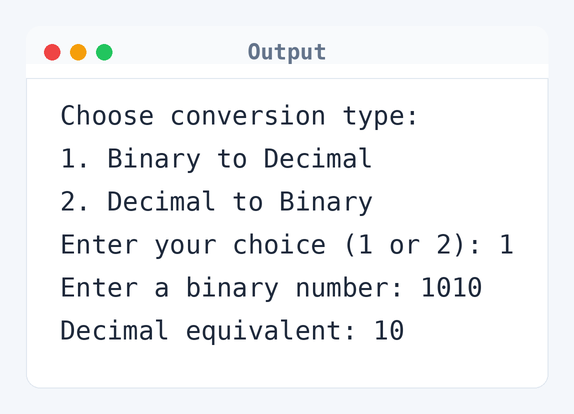
Algorithm to Convert Binary to Decimal in C
The conversion involves processing individual digits of the binary number, or using division for decimal numbers. Here's the step-by-step procedure:
- Choose the conversion type: Binary to Decimal or Decimal to Binary.
- If converting Binary to Decimal:
- Read a binary number.
- Initialize variables
decimalto 0 andbaseto 1. - Repeat while the binary number is not 0:
- Extract the last bit (digit) using modulus 10.
- Add this bit times the base to the decimal number.
- Multiply the base by 2.
- Remove the last bit from the binary number by dividing by 10.
- Output the resulting decimal number.
- If converting Decimal to Binary:
- Read a decimal number.
- Initialize variables
binaryto 0 andbaseto 1. - Repeat while the decimal number is not 0:
- Calculate the remainder of decimal divided by 2.
- Add this remainder times the base to the binary number.
- Multiply the base by 10.
- Divide the decimal number by 2 to remove the last bit.
- Output the resulting binary number.
flowchart TD
  A([Start]) --> B[/Choose conversion type: Binary to Decimal or Decimal to Binary/]
  B --> C{"Type == Binary to Decimal?"}
  C -->|Yes| D[/Input binary number/]
  D --> E[Initialize decimal = 0, base = 1]
  E --> F{binary != 0?}
  F -->|Yes| G[rem = binary %% 10]
  G --> H[decimal = decimal + rem * base]
  H --> I[base = base * 2]
  I --> J[binary = binary / 10]
  J --> F
  F -->|No| K([Output decimal])
  C -->|No| L[/Input decimal number/]
  L --> M[Initialize binary = 0, base = 1]
  M --> N{decimal != 0?}
  N -->|Yes| O[rem = decimal %% 2]
  O --> P[binary = binary + rem * base]
  P --> Q[base = base * 10]
  Q --> R[decimal = decimal / 2]
  R --> N
  N -->|No| S([Output binary])
  K --> T([End])
S --> THow the C Program to Convert Binary to Decimal Works
Let's break down the code to understand its functionality more deeply:
#include <stdio.h>: This line includes the standard input-output library.void convertBinaryToDecimal(): This function handles conversion from binary to decimal.int binary, decimal = 0, base = 1, rem;: Initializes variables for conversion.scanf("%d", &binary);: Reads the binary input from the user.while (binary != 0): Loops until the binary input has been fully processed.rem = binary % 10: Extracts the last digit of the binary input.decimal += rem * base: Adds the weighted binary digit to the decimal result.base *= 2: Increments the base by a power of 2 for the next digit.binary /= 10: Removes the last digit from the binary input.printf("Decimal equivalent: %d\n", decimal);: Outputs the decimal result.void convertDecimalToBinary(): This function converts decimal to binary.int decimal, binary = 0, base = 1, rem;: Initializes variables for this conversion.scanf("%d", &decimal);: Reads the decimal input from the user.while (decimal != 0): Loops until the decimal number has been converted.rem = decimal % 2: Finds the remainder when divided by 2.binary += rem * base: Adds the remainder in its place value to binary.base *= 10: Multiplies base by 10 to shift left for the next bit.decimal /= 2: Divides decimal by 2 to process the next bit.printf("Binary equivalent: %d\n", binary);: Outputs the binary result.int main(): Main function to execute the program.int choice;: Holds the user's choice for conversion.scanf("%d", &choice);: Takes user input for conversion option.if (choice == 1): Calls the function to convert binary to decimal if chosen.else if (choice == 2): Calls the function to convert decimal to binary if chosen.printf("Invalid choice\n");: Prints this if the choice is invalid.
Quick Quiz — test your understanding
Tap an option to check your answerWhat is the decimal equivalent of binary 1010?
Time and Space Complexity of the C Program to Convert Binary to Decimal
Let's discuss the efficiency of this program in terms of time and space:
Time Complexity: O(n). Here, n is the number of digits in the binary or decimal number. For instance, a binary number '1010' means four iterations. The program processes each digit once during conversion using loops like while (binary != 0).
Space Complexity: O(1). The program only uses a few integer variables like binary, decimal, base, and rem which do not grow with input size.
Common mistake: Confusing binary and decimal inputs can mess up the results. Always make sure you're working with the right number type for the conversion.
Key takeaway: Mastering conversions between binary and decimal is key to understanding low-level data representation in computers.
FAQs About C Program to Convert Binary to Decimal and vice-versa
Here are some common questions about the binary to decimal conversion program:
Related Programs
If you found this program helpful, check out these related programs:
- C Program to Convert Binary to Decimal with Code and Output
- C Program to Convert Hexadecimal to Decimal
- C Program to Convert Decimal to Octal
- C Program to Convert Octal to Binary with Example
- C Program to Convert Octal to Decimal: Full Code & Output
Conclusion
Getting the hang of binary to decimal and vice-versa conversions is fundamental in computer science. It's especially relevant in data processing and optimization. Play around with different inputs and see how the logic holds up. Think about beefing up the program with user input validation to make it tougher. Dig deeper into number systems and data representation for more insights. It'll help you tackle more complex problems.
Practice more with our C quizzes and test out those code modifications in the online compiler.