

Ever wondered how to generate the Fibonacci series using Java? It's a cool sequence starting with 0 and 1. Each next number is just the sum of the last two. Let's dive into how to create this in Java!
For instance, if you want the first 5 terms, you’ll get: 0, 1, 1, 2, 3. In this article, you'll learn how to write a program for it.
Prerequisites for the Fibonacci Program in Java
Here’s what you’ll need to know to write the program:
- Basic understanding of
forloops. - Using
intvariables in Java. - Java I/O —
Scannerclass for input. - Any Java compiler like JDK 8 or run it in the EduSeekho online compiler.
Source Code of Java Program to Print Fibonacci Series
Here’s the complete source code to print the Fibonacci series up to n terms:
import java.util.Scanner;

public class FibonacciSeries {
    public static void main(String[] args) {
        Scanner input = new Scanner(System.in);
        System.out.print("Enter the number of terms: ");
        int n = input.nextInt();

        int first = 0, second = 1;
        System.out.println("Fibonacci Series: ");

        for (int i = 1; i <= n; i++) {
            System.out.print(first + " ");

            int next = first + second;
            first = second;
            second = next;
        }
    }
}
Try this code yourself — free
Run it in the EduSeekho online compiler. No setup needed.
Output of the Fibonacci Series Program
When you enter the number of terms, this is the output:
Enter the number of terms: 5
Fibonacci Series: 0 1 1 2 3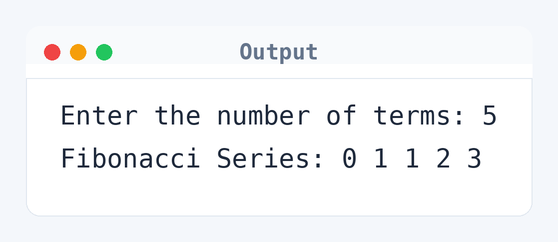
Algorithm to Print Fibonacci Series in Java
Generating the Fibonacci series involves adding the last two numbers to get the next one. Here's how this program achieves it:
- Read the number of terms
nfrom the user. - Initialize
firstto 0 andsecondto 1. - Start a loop from 1 to
n. - Print the
firstnumber. - Calculate
nextas the sum offirstandsecond. - Update
firsttosecondandsecondtonext. - Repeat steps 4-6 until all terms are printed.
flowchart TD
  A([Start]) --> B[/Read n/]
  B --> C["first = 0, second = 1"]
  C --> D["i = 1"]
  D --> E{"i <= n?"}
  E -->|Yes| F["print first"]
  F --> G["next = first + second"]
  G --> H["first = second, second = next"]
  H --> I["i = i + 1"]
  I --> E
E -->|No| J([End])How the Java Program to Print Fibonacci Works
Let's see what each part of the code does:
import java.util.Scanner;: Imports the Scanner class for user input.public class FibonacciSeries: Declares the main class, matching the filename.mainmethod: The entry point for the program, where the execution starts.Scanner input: Creates a Scanner object to read input from the user.System.out.print("Enter the number of terms: ");: Prompts the user to enter the number of terms.int n = input.nextInt();: Reads the number of terms as an integer.int first = 0, second = 1;: Initializes the first two numbers of the series.forloop: Iterates from 1 ton, printing and calculating Fibonacci numbers.System.out.print(first + " ");: Prints the current Fibonacci number.int next = first + second;: Computes the next Fibonacci number.first = second;andsecond = next;: Updatesfirstandsecondfor the next iteration.
Quick Quiz — test your understanding
Tap an option to check your answerWhat does the 'next' variable store in the Fibonacci program?
Time and Space Complexity of the Java Program to Print Fibonacci Series
Understanding the complexity can help you gauge the efficiency of your solution.
Time Complexity: O(n). The loop runs n times to print n terms — 5 terms means 5 iterations. The code includes for (int i = 1; i <= n; i++).
Space Complexity: O(1). It uses only a fixed number of variables: first, second, next, and n — four integers regardless of input size.
Common mistake:Not updating both first and second for the next term.
Key takeaway:The Fibonacci sequence can be generated efficiently using iteration, showing how powerful simple loops can be.
FAQs About Java Program to Print Fibonacci Series
Here are some common questions about this program.
first and second to kick things off with different numbers.Related Programs
If you found this program helpful, check out these related programs:
- Java Program to Find Duplicate Characters in a String
- Java Program to Find Prime Number | Full Code and Output
Conclusion
Switching up the initial numbers lets you create similar series like Lucas numbers. Give it a go! It really broadens your grasp of numerical sequences. Once you're good with this code, try generating Fibonacci numbers recursively.
Test your skills with our Java quiz or play around with this code in the Java compiler online.