

Sometimes, you gotta find duplicate characters in a string, like 'programming'. In this guide, we're gonna check out a Java program that does just that. It's super useful when you're dealing with text data.
Prerequisites for the Java Program to Find Duplicate Characters
Here's what you need for this program:
- Understanding of Java collections like
HashMap. - Basic knowledge of loops and conditionals in Java.
- Java Development Kit (JDK) 8 or newer.
- Any IDE like IntelliJ IDEA or Eclipse.
- The EduSeekho online compiler.
Source Code of Java Program to Find Duplicate Characters in a String
Let's take a look at the complete source code.
import java.util.HashMap;// Import HashMap

public class FindDuplicates {
    public static void main(String[] args) {
        java.util.Scanner scanner = new java.util.Scanner(System.in);
        System.out.print("Enter a string: ");
        String str = scanner.nextLine();

        HashMap<Character, Integer> charCountMap = new HashMap<>();

        char[] chars = str.toCharArray();

        for (char c : chars) {
            if (charCountMap.containsKey(c)) {
                charCountMap.put(c, charCountMap.get(c) + 1);
            } else {
                charCountMap.put(c, 1);
            }
        }

        System.out.println("Duplicate characters:");

        for (Map.Entry entry : charCountMap.entrySet()) {
            if (entry.getValue() > 1) {
                System.out.print(entry.getKey() + ", ");
            }
        }
    }
}
Try this code yourself — free
Run it in the EduSeekho online compiler. No setup needed.
Output of the Find Duplicate Characters Program
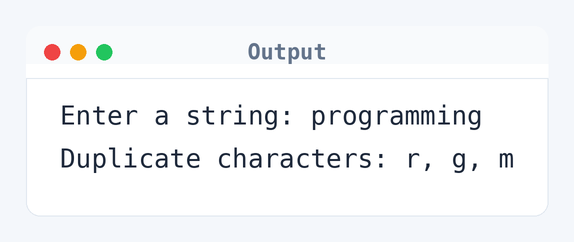
Here's what happens when you run the program and input 'programming'.
Enter a string: programming
Duplicate characters: r, g, m
Algorithm to Find Duplicate Characters in Java
Identifying duplicate characters involves checking each character's occurrence. Here's how the program works, step by step.
- Read the input string from the user.
- Convert the string to a character array.
- Use a
HashMapto store characters and their counts. - Iterate over the character array, updating counts in the map.
- Print characters that appear more than once.
flowchart TD
  A([Start]) --> B[/Read string/]
  B --> C{More characters?}
  C -->|Yes| D[Check character count]
  D --> E{Is duplicate?}
  E -->|Yes| F[Add to duplicates list]
  E -->|No| G[Increment character count]
  F --> G
  G --> C
C -->|No| H([End])How the Java Program to Find Duplicate Characters Works
Let's walk through the code to understand how it identifies duplicates.
import java.util.HashMap: This import allows us to use theHashMapclass for counting characters.Scanneris initialized to read input from the user.- We convert the input string into a character array to process it easily.
- For each character, the code checks if it already exists in the
HashMap. If it does, the count is incremented. - Characters with counts greater than 1 are considered duplicates and are printed.
Quick Quiz — test your understanding
Tap an option to check your answerWhat data structure is commonly used to count character occurrences?
Time and Space Complexity of the Java Program to Find Duplicate Characters
Understanding the complexity helps gauge the program's efficiency.
Time complexity: O(n), where n is the length of the string — 11 for 'programming'. The for loop iterates over the character array once to update counts in the HashMap.
Space complexity: O(n), because the HashMap can store up to all unique characters of the input string, like 'p', 'r', 'o', 'g', 'a', 'm', 'i', 'n', 'g'.
Common mistake: Not handling case sensitivity can mess up your results. Think about converting the string to lowercase.
Key takeaway: Using a HashMap is a smart way to count occurrences of elements in Java.FAQs About Java Program to Find Duplicate Characters
Here are some common queries students have.
Related Programs
If you found this program helpful, check out these related programs:
- Java Program to Print Fibonacci Series with Example Output
- Java Program to Find Prime Number | Full Code and Output
Conclusion
HashMaps are awesome for counting occurrences in Java. They make finding duplicates easy and quick. If you're feeling adventurous, try modifying the program to find duplicate words instead of characters. It’s a nice challenge that deepens your understanding of strings!
Practice finding duplicates with more Java programs in our Java quiz. Test and run them in the online compiler.