

Wanna create a multiplication table for a number? This C program lets you whip one up easily! Just input a number, and it'll show you the products from 1 to 10. Let's dive into how to build this.
Prerequisites for the C Program to Generate Multiplication Table
Before you start, ensure you understand the following:
- Using a
forloop in C. - The arithmetic operators
*and=. - Basic input/output functions like
printfandscanf. - Any C compiler such as GCC 9 or newer — or just run it in the EduSeekho online compiler.
Source Code of C Program to Generate Multiplication Table
Here's the complete source code to generate a multiplication table in C.
#include <stdio.h>

int main() {
    int n, i, product;
    // Prompt user for an integer
    printf("Enter an integer: ");
    scanf("%d", &n);

    // Loop from 1 to 10
    for (i = 1; i <= 10; i++) {
        product = n * i;
        // Print the result
        printf("%d x %d = %d\n", n, i, product);
    }

    return 0;
}
Try this code yourself — free
Run it in the EduSeekho online compiler. No setup needed.
Output of the Generate Multiplication Table Program
When you run the program and input a number, it prints the multiplication table up to 10.
Enter an integer: 5
5 x 1 = 5
5 x 2 = 10
5 x 3 = 15
5 x 4 = 20
5 x 5 = 25
5 x 6 = 30
5 x 7 = 35
5 x 8 = 40
5 x 9 = 45
5 x 10 = 50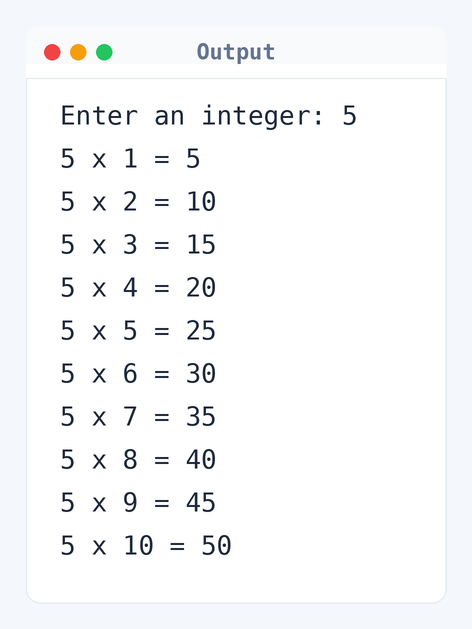
Algorithm to Generate Multiplication Table in C
Generating a multiplication table involves multiplying the input number with numbers 1 through 10. Here's how the program handles this step by step.
- Read the integer
nfrom the user. - Initialize
ito 1. - Check if
iis less than or equal to 10. - Calculate the product of
nandi. - Print
n,i, and the product. - Increment
iby 1. - Repeat steps 3-6 until
iis greater than 10.
flowchart TD
  A([Start]) --> B[/Read number n/]
  B --> C[i = 1]
  C --> D{"i <= 10?"}
  D -->|Yes| E["product = n * i"]
  E --> F["Print n, i, product"]
  F --> G[i = i + 1]
  G --> D
D -->|No| H([End])How the C Program to Generate Multiplication Table Works
Here's a detailed look at how the code operates line by line.
- The line
#include <stdio.h>includes the standard input and output library, necessary for usingprintfandscanf. - We declare an integer variable
nto store the number whose table we want, andiandproductto handle loop iteration and results. printf("Enter an integer: ")prompts the user to input an integer.scanf("%d", &n)reads the integer input and stores it inn.- The
forloopfor (i = 1; i <= 10; i++)runs 10 times, iteratingifrom 1 to 10. - Inside the loop,
product = n * icalculates the current product. printf("%d x %d = %d\n", n, i, product)prints each line of the multiplication table.- Finally, the program ends with
return 0, signaling successful completion.
Quick Quiz — test your understanding
Tap an option to check your answerWhat does the loop condition i <= 10 ensure in the program?
How Fast is the Generate Multiplication Table Program in C?
Analyzing the time and space complexity gives insight into the program's efficiency.
Time Complexity: O(1). The program runs a loop that executes exactly 10 times, regardless of the input number. The loop is for (i = 1; i <= 10; i++), and since it has a fixed number of iterations, the time complexity is constant. It's a constant time, always executing 10 iterations.
Space Complexity: O(1). It uses only a few integers: n, i, and product. These do not grow with input size, resulting in constant space usage regardless of the input.
Common mistake: Not including the right header files like <stdio.h> can mess up your input and output functions.
Key takeaway: Using a loop for the multiplication table keeps things consistent and makes the code simpler.
FAQs About the C Program to Generate Multiplication Table
Here are some common questions students often have.
i <= 10 to i <= 20 to make the table longer.Related Programs
If you found this program helpful, check out these related programs:
- C Program to Find Factorial of a Number
- C Program to Count Number of Digits in an Integer
- C Program to Reverse a Number with Example
- C Program to Check Whether a Number is Palindrome or Not
- C Program to Display Fibonacci Sequence with Example
Conclusion
Multiplication tables are super basic in math education, and this program makes generating them a breeze. You might want to think about extending it for different ranges or adding interactive features, like choosing the range on the fly. Grasping loops through this is a solid foundation for diving into more complex algorithms. Ready to push your skills further?
Try out more C programming problems in our C language quiz or run this code straight in the EduSeekho online compiler.